How to Get WhatsApp Business API: A Step-By-Step Guide for Free Access
-
 Tarun Gupta
 September 17, 2025
In 2025, integrating WhatsApp Business API into its operation is more accessible than ever. This guide provides a broad walkthrough to help you get API at zero cost, from eligibility to setup and approval. BUt, let us get some brief information on WhatsApp Business APIs and platforms, and what they mean.
Brief Understanding: WhatsApp Business API
WhatsApp Business API enables businesses to communicate with customers on a scale, offering features such as automated messages, CRM integration and analytics. Unlike WhatsApp Business App, API is designed as a medium for large businesses requiring advanced functioning.
What Does It Mean To Have A WhatsApp Business API Account?
A WABA or WhatsApp Business API Account is a communication front for medium to large companies to communicate with their clients using messaging at scale. The WhatsApp Business App is restrictive and has a preset of contacts based on your volume of contact. The WhatsApp API has enterprise grade capabilities to help you simplify interactions and communications with your clients.
Key Benefits:
Scalability
As we said above, the automated and instantaneous messaging allows you to handle thousands of conversations without limits. No more distracting phone gestures to hinder you in serving your clients efficiently.
Professionalism
Verified Business accounts build trust and authority with your clients.
Globalization
Your business can reach users in 180+ countries effectively taking advantage of WhatsApp over 1.5 billion users world-wide biggest and fastest growing messaging platform.
Rich Messaging
Include photos, videos, documents and interactive messages with quick replies and list messages.
Compliance
End-to-end encryption and data privacy policies are standard and provide a secure experience for customer conversations.
What role does a WhatsApp Business API Platform plays?
WhatsApp Business API Platform is not just an account it is the base that builds the integration into your business. Easily connect WhatsApp to your current CRM, support application, or e-commerce system. It offers:
Seamless Integration
Create the ATL of users and synchronize your customer conversations into your CRM tools like Salesforce or HubSpot for an integrated 360 degree view of your customers.
Automated Messaging
Build ChatBots for FAQ, appointment reminders, order status etc.
Multi-Agent Support
Provide multiple support agents to engage at one time allowing the team to respond faster improving overall responsiveness.
Advanced Analytics
Gain insights on message delivery, read status, and engagement to improve your strategies
Custom Workflows
Enhance customer journeys with automated sequences and triggered messages
Integrating WhatsApp Business API to your Businesses: Perks
By integrating the WhatsApp Business API into your existing business ecosystem you will unlock many advantages such as:
- Better Customer Support: Fix issues quicker than before with automated responses and human agent handoffs.
- Better Marketing RoI: Deliver targeted campaigns that take advantage of WhatsApp’s impressive open and read rates.
- More Efficiency: Automate standard questions and free up your and your team’s time and resources.
- Faster Conversions: Interact with customers in real-time to better grow leads.
- Learn About Global Customers: Interact with customers no matter where they are and support your global customers.
Use Cases with Proposed Integration can be:
- E-Commerce: Send order confirmations, shipping updates, and personalized offers.
- Travel: Send boarding passes, travel alerts, and travel itinerary information.
- Healthcare: Confirm appointments, send lab results, and provide tele-health consultations.
- Banking: Send account updates, alerts about fraud and provide a secure way for transactions.
With WhatsApp Business API integrated into your business, you can turn one of the world’s top messaging apps into a powerful growth tool that builds customer loyalty.
Getting WhatsApp Business APIs: Eligibility Criteria
Before applying, make sure you meet the following requirements:
Registered Business
You must have a legally registered business unit.
Business Website & Email
A professional website and domain-based email address is required.
Fresh Phone Number
Do not use the phone number linked to any WhatsApp account in advance.
Compliance of Policies
Follow the conditions of WhatsApp business, commerce and solution.
Step-By-Step Guide to Access WhatsApp Business API for free
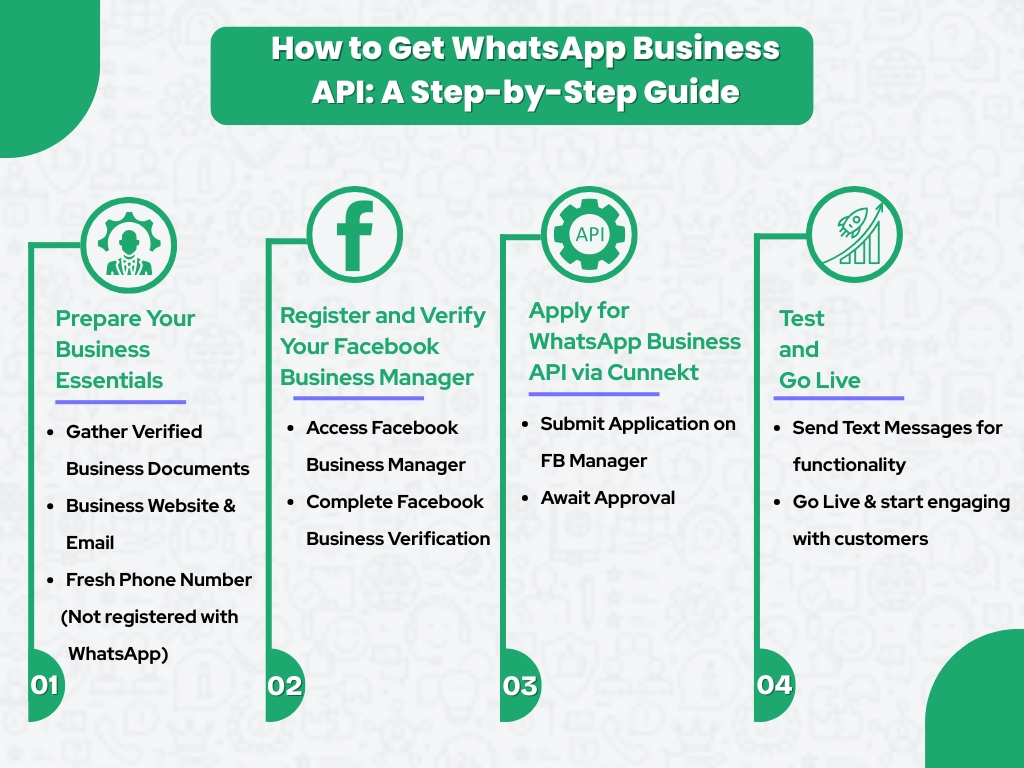
Step 1: Create a Meta Business Account
- Go to [Meta Business Manager] and log in with your Facebook credentials.
- Create a new business account by providing your business details.
Step 2: Verify your Business
- Professional Settings> Navigate to the Security Center.
- Start the verification process by submitting the necessary documents, such as proof of business registration certificate and address.
- Verification usually takes between 2 to 15 working days.
For further registration, you can connect with Cunnekt’s Team. The platform member will guide through the dynamic process in short-quick steps.
Tips for a Smooth Setup:
Use a Dedicated Phone Number
Make sure the number is not linked to any existing WhatsApp account.
Prepare Accurate Documents
To avoid delay in verification, submit clear and valid documents.
Understand the Messaging Rules
Avoid yourself with a 24-hour messaging window and template message requirements.
Leverage Official Resources
Use [Documentation as per Meta] for detailed guidance.
Conclusion
By following this guide, you can unlock WhatsApp business API without costs, making your business capable of increasing customer communication and driving growth. Stay in conformity with WhatsApp policies and bring the benefits of platform capabilities to their full capacity.
Categories
About the Writer

Tarun Gupta
Related Articles
Top 7 Customer Communication Mistakes on WhatsApp that hurt your Business
The Mistakes: There are seven important customers’ communication blunders to escape: Inc
WhatsApp Business Marketing Strategies: How to Drive More Sales in 2025
The digital world of today is intensely competitive. To ensure that they maintain a compet
Email vs. WhatsApp Marketing: Which One Drives More Conversions?
In the sometimes developed scenario of digital outreach, Marketers are constantly searchin
How to Create an Effective WhatsApp Funnel for Lead Nurturing?
Lead nutrition is the process of having and maintaining relationships with potential custo


